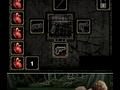
Tap and hold the ammunition clip with the stylus. While that is held, tap and hold the left corner where the ammunition is supposed to be dropped with your finger. Lift up the stylus and the ammo clip will instantly appear where your finger is held on the touch screen. Lift up your finger and you will reload.
When you get down into the tunnels, use the crowbar on the zombies instead of your guns. When you reach the part in the tunnels when the bats fly at you, use your hand gun on them. After that, use a combination of your shotgun and hand gun on the zombies. If you can do this successfully, you can finally get out of the tunnels and out of the chapter. There will be more zombies outside the tunnels for awhile; be ready for them.
To kill the shambling zombies that cover their faces, use the shotgun. Fire a shot to their ankles to kill them. Note: This only work when they are standing fully upright.
Press X, Y, Right, Left, X at the main menu. The sound of a zombie will confirm correct code entry, and the logo will turn red. All missions, modes, and bonuses will be unlocked. During game play, you can now use L and R to cycle through the camera views.
Fight against swamp zombies
These zombies are smarter than the others. They will protect their heads with their arms. Use your hand gun on their legs when they are at a good distance, but still fairly close. You might have to shoot in quick succession for it to work effectively. Alternately, just blow their legs out with the shotgun. Be careful with your ammunition, as you will need it for the Boss at the end of the swamps.
Successfully complete the game in Normal mode.
Successfully complete the game in Furious mode.
Kill the Face-Covering Zombies
In level 3, the shambling zombies that cover their face seem hard to kill, but they are easily dispatched with the shotgun. One shot to the ankles will kill them. It will only work if they are standing fully upright.
More Cheats, Achievements